
Instead of manually checking reorder notes each day, build a wholesale menswear seasonal buying calendar that turns each range review into an assigned task, then requires approval before an order proceeds. Connect your spreadsheet to recurring calendar reminders—not to an assumed supplier integration—so you know what to review, who decides and which dates need confirmation.
- For Blkwd wholesale menswear buyers, use calendar reminders to trigger reviews, not automatic purchases.
- A wholesale menswear seasonal buying calendar needs separate review, approval and delivery-planning dates.
- Track menswear reorders by style, colour and size rather than category totals alone.
- Use confirmed supplier timing to calculate deadlines; keep assumptions out of your seasonal buying plan.
Why this matters
A seasonal launch and a replenishment decision answer different questions. Your launch plan sets when a range should reach customers; your reorder review decides whether particular variants deserve another commitment.
Blkwd sells men's clothing directly to consumers and offers wholesale options for retailers. For retailers buying Blkwd wholesale menswear, the best setup is a dated review with a separate order-approval step. The retailer's calendar remains the planning tool, not the supplier's storefront.
Build your 2026 calendar around your own selling periods and confirmed supplier dates. Australian seasons provide context, but a national season label does not establish demand for your particular store, location or customer.
Before you start
- Access and ownership: Have your inventory and sales records, a shared spreadsheet, a calendar you can edit, and a named person authorised to approve purchases. Use your existing wholesale ordering arrangement separately.
- Planning materials: Gather variant identifiers, quantities held, outstanding orders, customer commitments and confirmed supplier timing. Record the date of each check so an old figure does not look current.
- The gotcha: A calendar reminder is not an order acknowledgement. Keep proposed quantities separate from submitted orders, and do not treat a tentative delivery date as confirmed.
This workflow uses fields you create yourself. Bold labels below are suggested spreadsheet column names or event titles, not claims about labels inside a supplier portal or a particular calendar application.
Configuration unit: Your buying register
Start with one shared register rather than separate documents for every person. The register holds the decision; the calendar points people to it.
- Create a sheet named Buying register 2026. Give each review a unique Review reference so you can find it from a calendar event without relying on a product nickname.
- Add Style identifier, Colour, Size, Quantity held, Outstanding quantity, Customer commitments and Sales period. Keep variant identifiers as text if leading zeros matter.
- Add Units sold, Proposed quantity, Review date, Decision owner, Decision and Reason. Record the dates covered by the sales period, not just a total with no context.
- Add Target selling date, Confirmed supplier timing, Submission deadline, Order reference and Confirmation date. Leave unconfirmed dates blank rather than filling them with assumed turnaround times.
- Create a separate calendar event for each review group. Put its Review reference and a link to the shared register in the event description, then invite the decision owner.
Expected result: Opening a review event takes the buyer to identifiable variants, dated evidence and a named decision owner. A blank confirmation field remains visibly different from a confirmed commitment.
Do not add proposed units to quantities already ordered. Combining those figures makes a suggestion look like an incoming delivery and can hide the need for an actual decision.
Configuration unit: Your seasonal milestones
Work backwards from when you want the range ready to sell. Do not work forwards from an arbitrary reminder date and assume everything else will fit.
- Create Target selling date milestones for the selling periods your store actually plans to serve. Use specific dates in 2026, with separate milestones where different locations or channels need different timing.
- Record the supplier timing confirmed for the relevant order. Note what that timing measures: dispatch, arrival or another agreed milestone. Those are not interchangeable dates.
- Allow time for your own receiving, checking, photography and merchandising tasks. Enter your actual task estimates; do not copy a generic fashion-industry lead time.
- Calculate the Submission deadline backwards from the target selling date using the confirmed timing and your internal preparation allowance. Schedule Order approval before that deadline, with enough room for your own approval process.
- Create the Range review event before approval. Its description should identify the review group, decision owner, evidence required and next deadline.
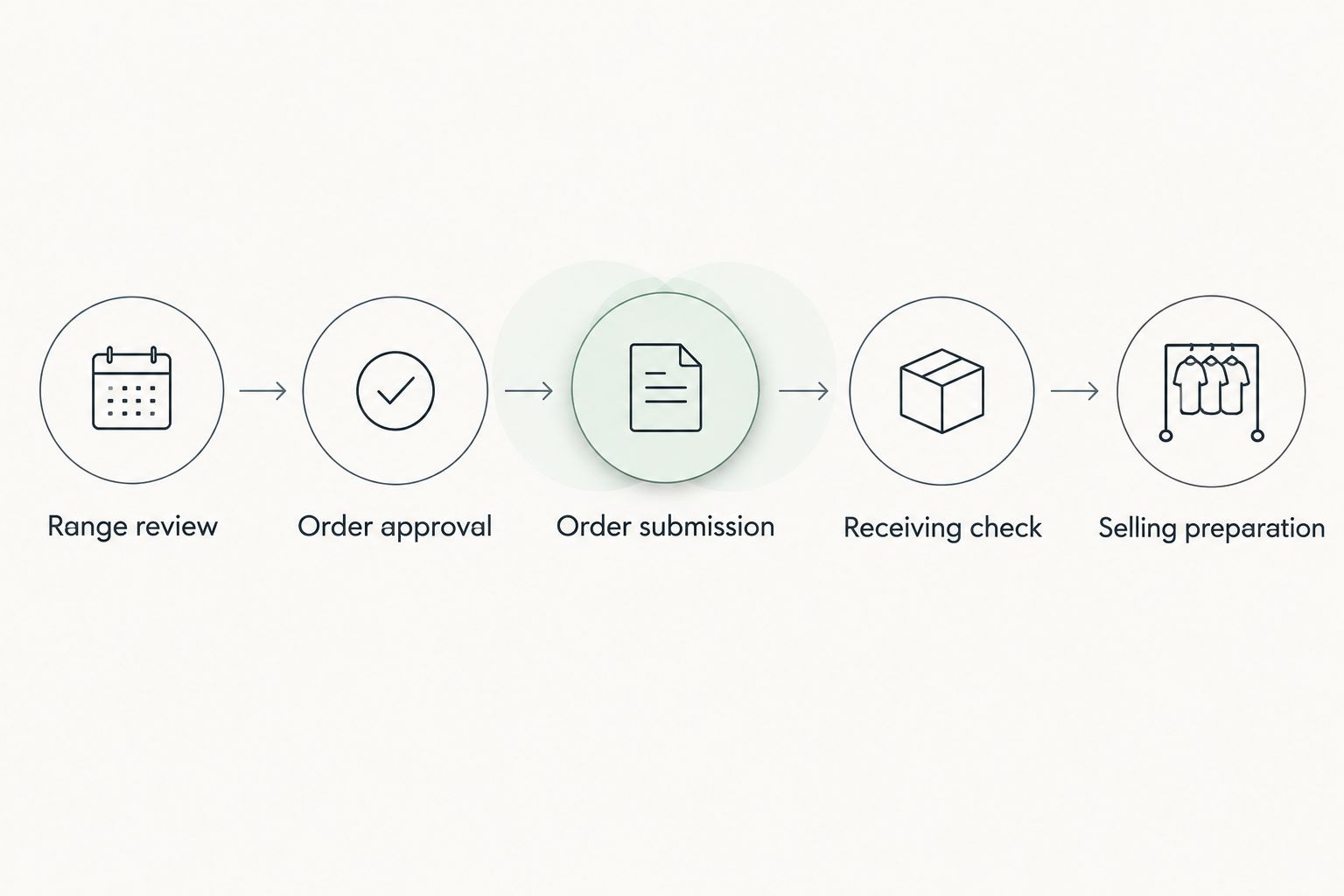
Expected result: Your calendar shows a sequence from review to approval to selling preparation. Every deadline has an owner and an explainable basis.
The sequence is simple: Range review, Order approval, Order submission, Receiving check, Selling preparation. Keep these as separate milestones even when the same person handles them.
Configuration unit: Your recurring review
Use a recurring event to prompt a decision, not to repeat the last order. The quantities should come from current records each time.
- Set an initial review interval of 7 days if a weekly review fits your store. This is a starting configuration, not a benchmark or supplier requirement. Change it when your trading pattern justifies a different cadence.
- Use a consistent observation window, such as 28 days, for the first review cycle. Record the window beside each sales figure so later comparisons use the same basis.
- Set a reminder 1 day before the review to refresh the register. These three settings are example workflow choices, not evidence of how quickly any product sells.
- At the meeting, review quantities held, outstanding orders, customer commitments and recent sales by variant. Explain unusual trading periods before using those sales to propose another purchase.
- Record Approve, Hold or Reject in Decision, with a reason and a date. Move approved proposals to the separate approval task; do not let the recurring reminder authorise spending.
Expected result: Each occurrence produces a recorded decision or an explicit hold. The next event does not inherit an old quantity as though it were newly approved.
For the remaining 2026 review cycle, keep the initial cadence consistent long enough to assess whether it fits your workload. Adjust deliberately rather than adding more reminders whenever a decision feels urgent.
Configuration unit: Your order hand-off
A good review can still fail if nobody owns the hand-off. Assign submission, acknowledgement checking and receiving to named people.
- Have the authorised buyer check the proposed variants and quantities against the current records. Record approval against the exact version being submitted.
- Submit the approved order through your agreed wholesale ordering process. Mark the submission date and enter the order reference when one is provided.
- Record the supplier's acknowledgement separately from your internal approval. Update Confirmed supplier timing only from a relevant confirmation, not from the original target date.
- On receipt, reconcile what arrived against the order record. Keep discrepancies open as follow-up tasks rather than closing the entire review automatically.
Expected result: You can distinguish a proposal, an approved purchase, a submitted order and a reconciled receipt. None of those states depends on remembering an email conversation.
If your next task is publishing received items online, use the guide to listing wholesale stock on Shopify. Keep catalogue preparation separate from purchase approval so a listing task does not become an unintended buying instruction.
Variant: Review whenever a buying assumption changes
A fixed calendar handles routine work. An exception review handles a material change between scheduled meetings, such as a corrected inventory count, a changed customer commitment or revised supplier timing.
Create an Exception review task referencing the original Review reference. Describe what changed, identify which variants are affected and assign the same decision owner unless responsibility has formally changed.
| Workflow | Best for | Advantage | Limitation |
|---|---|---|---|
| Scheduled review | Planned range decisions and routine replenishment checks | Creates a predictable decision cadence | A change between meetings needs separate attention |
| Exception review | Changes that affect an existing buying decision | Focuses attention on the affected variants | Poorly defined triggers create duplicate work |
Use scheduled reviews as the default and exception reviews as a supplement. The two workflows should update the same register, not create competing order lists.
Where your existing systems support documented automation, let an update create a review task rather than a purchase. Without that connection, assign a person to create the task; a manual hand-off is clearer than an automation nobody has verified.
Close the exception only after recording its effect on quantities, deadlines or the decision. If nothing changes, record that outcome too.
Troubleshooting
Reminders appear, but no decision follows
Assign a named Decision owner and put the required decision in the event description. An invitation to several people is not an assignment; use Hold with a reason when the buyer cannot decide.
A product total hides a size-level problem
Separate the record by style, colour and size. Review variant-level quantities and sales before changing the proposal; a category total cannot identify which size needs attention.
The same reorder appears in two tasks
Compare Review reference and Order reference before submission. Merge duplicate proposals into the original record, close the duplicate task and retain a note explaining the change.
The target selling date no longer fits
Recalculate the sequence using the revised confirmed timing and your internal preparation allowance. Mark the affected selling milestone for a decision rather than silently moving every dependent task.
A shared event opens an inaccessible document
Test the register link using the decision owner's access before the first live review. Share only the permissions that person needs, and keep sensitive purchasing information out of calendar descriptions visible to a wider team.
Customize your workflow
Start with one review group, then expand the register when the hand-off works. Separate ongoing replenishment from seasonal range decisions because the evidence and deadlines differ.
For Blkwd wholesale menswear, use categories such as shirts, polos, denim or blazers only as review groups—not as automatic reorder instructions. Each decision still needs identifiable variants and your own trading evidence.
Add a Channel or Location field when different stores or selling channels need separate allocations. Keep a shared view of outstanding commitments so two buyers do not independently propose units against the same need.
For your 2026 buying plan, save a dated decision snapshot after each approval. A live register tells you what is current; the snapshot explains what the buyer approved at that point.
FAQ
How do I connect wholesale reorders to my buying calendar?
Create calendar review events that link to a shared buying register, then separate review, approval and submission tasks. Record variant quantities, owners and confirmed supplier timing in the register rather than relying on event titles alone.
Does this workflow automatically order from Blkwd?
No, this workflow creates review and approval tasks, not automatic purchases. Submit approved orders through your agreed wholesale ordering process and record confirmation separately.
How often should I review menswear reorders?
Choose a cadence that fits your trading pattern and buying workload. A 7-day interval is an example starting setting in this guide, not a supplier requirement or a proven optimum.
Should I plan by Australian season or by sales history?
Use your store's sales history and intended selling periods to make buying decisions. Australian seasons provide context, but they do not establish demand for a particular store or customer group.
Which dates belong in a wholesale menswear seasonal buying calendar?
Include range review, order approval, submission deadline, receiving check and selling preparation dates. Calculate deadlines from confirmed supplier timing and your own preparation requirements.
What should trigger an extra reorder review?
Create an exception review when a changed assumption affects an existing decision. Examples include corrected quantities, changed customer commitments or revised supplier timing; check for an existing task before creating another.
Can I use a spreadsheet instead of a buying system?
Yes, you can use a shared spreadsheet for this review-and-approval workflow. Keep unique references, clear ownership and dated decisions so the calendar points to one consistent record.
One last thing
A completed calendar task proves that someone closed a task—not that an order was submitted or received. Keep acknowledgement and receiving records separate from calendar completion throughout 2026, and make the order reference the hand-off between people.
Before your next review, check one existing purchase from proposal through receipt. If you cannot follow that trail, fix the record before adding another reminder.